

What a token costs: five routes, the math, and the break-even point

The question that always comes up, before buying a GPU or subscribing to an API: what does a token really cost, and where does it come from? The answer isn't one thing. It's five routes, with very different costs, ceilings, and dependencies. Here we put them side by side, with today's numbers verified against the official price lists, and tell you when renting or owning the hardware beats calling the frontier.
The token, the unit of account
Every interaction with a model is measured in tokens: pieces of text (split words) going in and out. A million tokens is roughly 750,000 words: a conversation of a few thousand words is a handful of thousand tokens. Whoever sells you intelligence — an API, a provider, a server — does it in tokens (or, indirectly, in seconds of GPU that produce tokens). Understanding where the token comes from and what it costs you is the whole game, because the price per token varies by more than a hundred times depending on the route.
Route 1 — The frontier model via API
You call OpenAI or Anthropic and get their most capable model. It's the highest ceiling that exists today: for the hardest work, the agent that chains actions, complex synthesis, the frontier models still lead. The price is per token and reflects that ceiling. OpenAI's price list today: the GPT-6 Astra flagship at $10 per million input tokens and $50 per million output; the mid GPT-5.6 Terra tier at $2 and $12; the high-volume GPT-5.6 Luna at $0.20 input and $1.20 output (verified on the official page). Anthropic follows the same logic with its Claude models.
What you get: the best, zero setup, unlimited scale. What you pay beyond the price: your prompts and your data cross the network and land on the provider's servers; quality and price can change whenever the vendor decides; and if the service stops, so does yours.
Route 1b — The subscription, when you use little
Next to the API there's a second way to pay for the frontier: the monthly ChatGPT or Claude subscription. Plus costs $20 a month, Pro $100 or $200 depending on the usage tier (official list). The difference is the cost model:
| Subscription (Plus) | API (GPT-6 Astra) | |
|---|---|---|
| Cost | $20/month flat | usage-based, zero if unused |
| Included volume | ~160 messages per 3 hours | unlimited, paid per token |
| 1,000 responses/month (~500 tokens each) | covered by the subscription | ~$21 (Astra) · ~$5 (Terra) |
| 10 million tokens/month | impossible (caps) | ~$10–420 depending on model (Luna → Astra) |
The math is simple: personal use (hundreds of conversations a month) stays comfortably inside $20, while the same volume through the API would cost little or nothing. But the moment volume grows — hundreds of thousands of tokens a day, a service with many users — the subscription hits its caps and the API becomes the only route again. The subscription wins on light use, the API on heavy use: they're not two offers of the same product, they're two demand bands.
Route 2 — Inference providers
Same convenience as the API, but on open models: Replicate, Modal, RunPod serverless. You load an open-weight model (or pick one from their catalog) and pay when it runs. Modal bills you by the second: an H100 at $3.95/hour, an A100 80GB at $2.50 (official list). RunPod serverless runs the same way with workers that scale to zero when they're not needed: an RTX 4090 on serverless at $1.10/hour.
The advantage over the frontier is double: often models that are nearly as good for a lot less, plus open models you can also download and take home. The limit is that you're still renting: you own nothing, and the data still passes through their cloud.
Route 3 — Renting the hardware
One step down: instead of asking for tokens, you take the server yourself. On RunPod and Vast.ai you rent a GPU billed by the minute: an RTX 4090 at $0.34–0.74/hour depending on tier (community without SLA or secure with SLA), an H100 at $2.00–3.99. On Vast.ai the interruptible option is more than 50% cheaper but can be reclaimed at any moment; the reserved option locks prices up to 50% lower on one-, three- or six-month terms (official list).
Here the nature of the relationship changes: the model is yours, it runs on a machine you're renting, and the data doesn't end up in an intelligence API. You pay only while the server runs. When the load is steady and large, direct renting beats both the frontier API and the inference provider, because you're paying for raw GPU instead of value-added intelligence.
Route 4 — Owning the hardware
The purchase: a GPU (or a Mac, or a mini-PC), and you're off. The cost is one-time — an RTX 4090 24GB around €1,600, a used 24GB 3090 around €1,000 — plus the electricity while it runs. No tokens to pay, no minutes to bill: the model is there, always available, and no byte of your data leaves the house or the business.
It's the only route where "always available" is literally true: it depends on no network, no vendor, no price that can change. And it's the only one where the data never leaves.
The numbers, lined up
A concrete example: 20 million tokens a month (some customer support, some summarization), with a realistic mix of 4 million input and 16 million output. The calculation is input ÷ 1M × input price + output ÷ 1M × output price (in euros, 1$ = 0.92):
| Route | Calculation | Monthly cost |
|---|---|---|
| GPT-6 Astra API | 4×10 + 16×50 | ~€773 |
| GPT-5.6 Terra API | 4×2 + 16×12 | ~€184 |
| GPT-5.6 Luna API | 4×0.20 + 16×1.20 | ~€18 |
| 4090 rental (secure), 24 h | $0.74/h × 730 h | ~€497 |
| 4090 rental (secure), 8 h/day | $0.74/h × 244 h | ~€166 |
| Your 4090, €1,700 | €1,700 over 36 months + power | ~€87 |
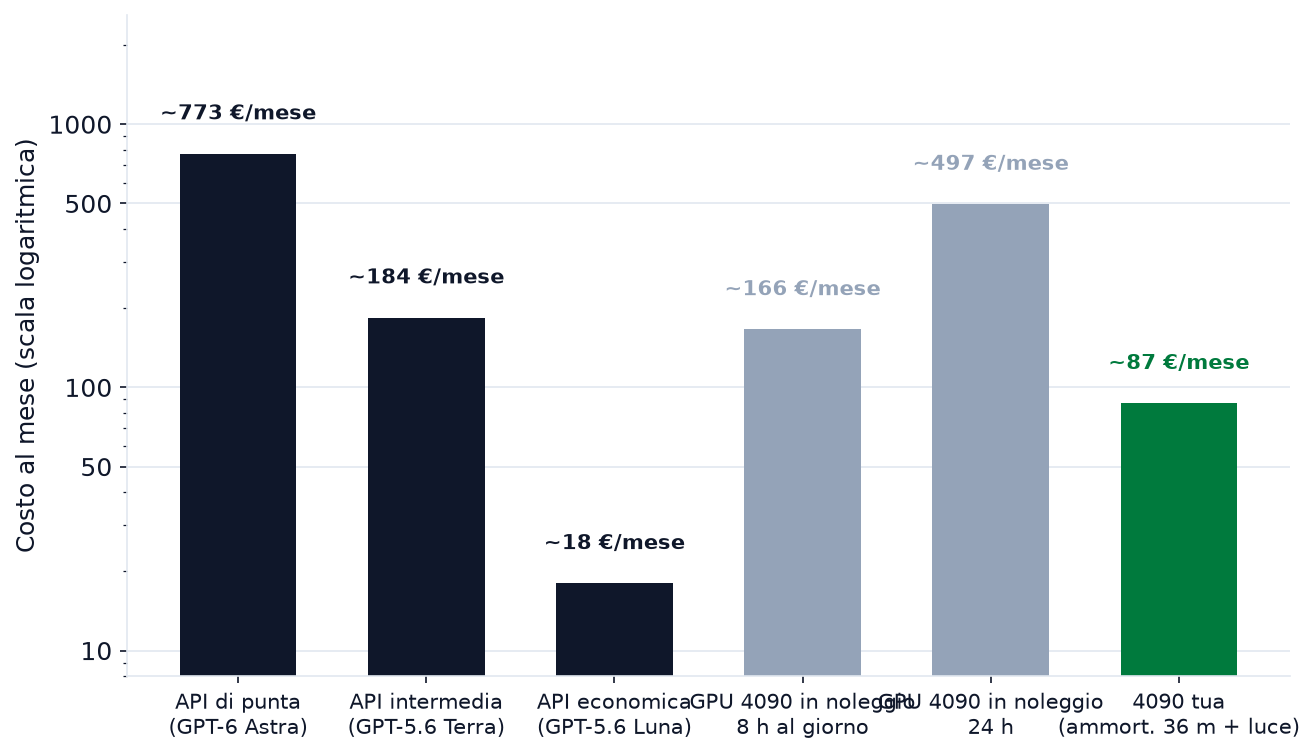
The chart says the same thing as the table, only faster: for exactly the same workload the price varies from €18 to €773, a 40-fold spread. It's not a printing error — you're buying two different things: the quality ceiling, and the risk (yours, or the vendor's).
What electricity really costs
The most underestimated line in owning. A machine with a 4090 under generation load pulls 350–450 W, plus about 100 W for the rest of the system (CPU, RAM, disks). At rest with the model loaded in memory: 80–100 W. The monthly bill at €0.25/kWh (a typical base tariff):
- 8 hours a day of work (122 kWh load + 100 at rest → 158 kWh): ~€40/month
- 18 hours a day (282 + 58 kWh → 265 kWh): ~€66/month
- 24/7: 329 kWh → ~€82/month
The formula to keep: watts ÷ 1000 × hours × rate, load hours plus idle hours. At €0.30/kWh (the higher tariff) multiply by 1.2. Two notes: the machine consumes even when not generating (that's why rest with the model loaded counts), and a Mac with unified memory draws a tenth as much (30 W total instead of 450), so the power line on a Mac is effectively negligible.
Hardware ROI: when it pays back
Let's line up the cumulative cost over 36 months. Scenario: 4090 at €1,600 + €100 of peripherals (€1,700 total), 36-month amortization, power at €40/month (daily use, 8 hours a day).
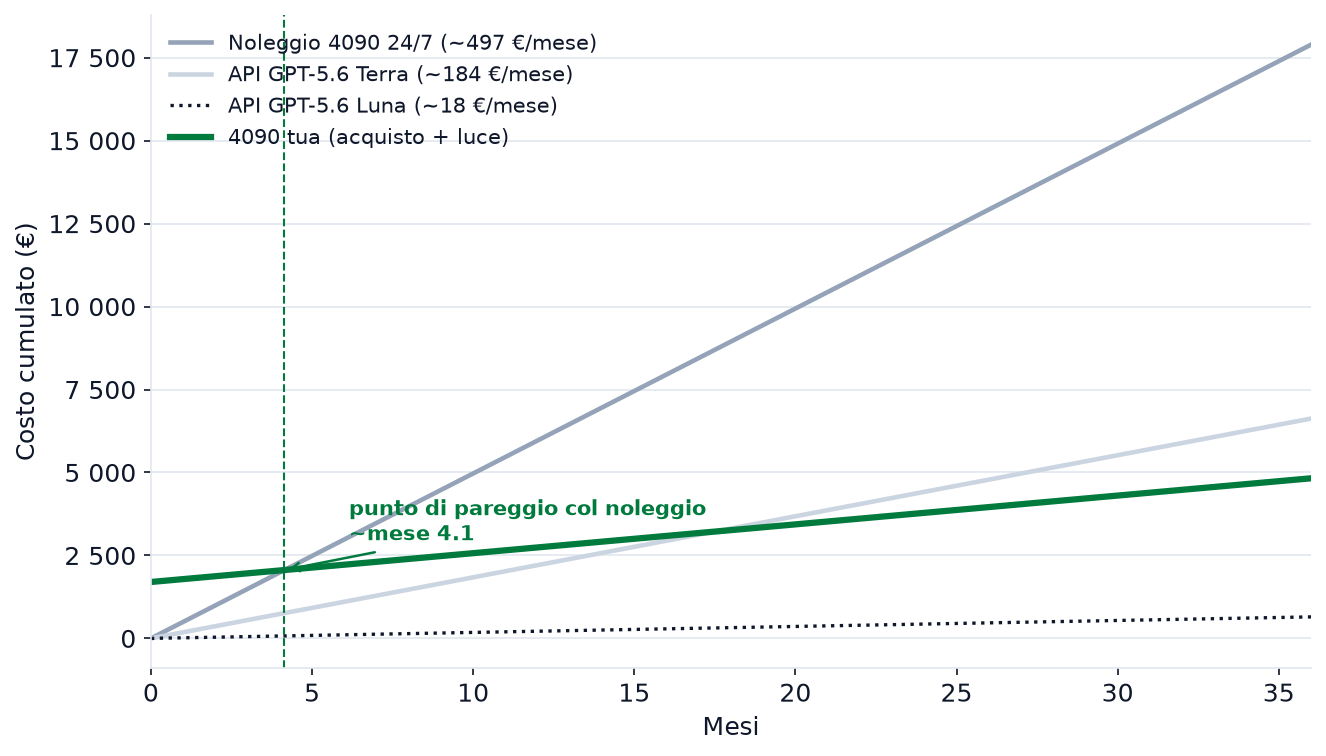
- Month 1: hardware ~€1,790, 24/7 rental ~€497, Terra API ~€184, Luna API ~€18. For the first three months the API stays the cheapest route.
- Around month 4: the break-even point with 24/7 rental (€497/month versus €87/month + €1,700 upfront). From there on, the ownership curve is the lowest among the open-model routes, and the gap widens month after month.
- Month 36: hardware ~€4,825 total versus €17,892 of continuous rental, €6,624 of Terra API, €27,828 of Astra API.
The break-even point is calculated with your load: rental (€/h × hours/month) versus amortization (price ÷ months) + power. If the server runs more than 5–6 months, at equal model ownership wins almost always; if the load is intermittent, renting or the economical API stay ahead. And there's the quality variable: if your work truly needs the frontier peak, consumer hardware isn't an alternative, it's a different tool — and the economical move is the mix: 90% of the volume on the open model, 10% on the frontier.
Where renting and owning win
Three signals that say "stop paying the frontier": your load is steady (the server runs a lot, so direct renting or owning beats value-added billing); the model that's good enough for you is open (at which point you're only paying for convenience you could remove); and the data has to stay yours (then only owning — and, second, renting — fits). In those three cases, renting and owned hardware aren't the plan B: they're the plan that costs less and keeps the control in your hands.
How to choose
- Light, personal use: the subscription — $20 a month covers hundreds of conversations.
- Prototypes and testing, irregular loads: API or inference provider — start from zero fixed costs.
- Steady load, open model, budget to hold for a few months: rent the direct GPU.
- Steady load for more than six months, sensitive data, 24/7 availability: buy. It's the only route with no dependencies.
- The hardest work that only exists in the frontier: pay for it — but only that piece, not everything else.
Most real workloads are a mix. The move that saves money is to decompose them: 90% of the volume on the open model (rented or owned), 10% of the real work on the frontier. In that mix, the token that matters most — the one that produces value — comes from the hardware you control. If you want to size the workload on your hardware before deciding, start from the Setup planner.
Sources
- OpenAI pricing (GPT-6, GPT-5.6) — official list
- ChatGPT pricing (Free, Go, Plus, Pro, Business) — official list
- Anthropic pricing
- Modal pricing (per-second GPU)
- RunPod pricing (community, secure, serverless)
- Vast.ai pricing (on-demand, interruptible, reserved)
- 2026 GPU cloud pricing comparison
- RTX 4090 real power draw under inference load
- Local hardware costs
Article generated with AI
In these reading paths
Enjoyed this article?
Subscribe to the newsletter for new tutorials and guides.
Related Articles
NVIDIA, AMD and Intel for local AI: which platform to choose
CUDA, ROCm or Vulkan? We compare the three local-AI platforms based on what is actually available: official software stacks, cards by VRAM tier (12, 16 and 24GB) and real speeds. Where the obvious choice remains, where AMD wins on value, and when it makes sense to leave NVIDIA.
Qwen3.8-27B vs Gemma 4 26B A4B: the new frontier at 24GB
A 27.8B dense or a MoE with 3.8B active, a 262K context against 256K and almost the same weight at Q4_K_M: two opposite ways of putting big-model quality on a 24GB consumer card. Which is faster, which goes deeper, and when to pick one over the other.